Security
Security Is Architecture, Not Decoration
Security works best when it's built into boundaries, deploy paths, and secrets handling from the start — not painted on at the end.
- Security
- Architecture
- Least Privilege
- Secrets
- Operations
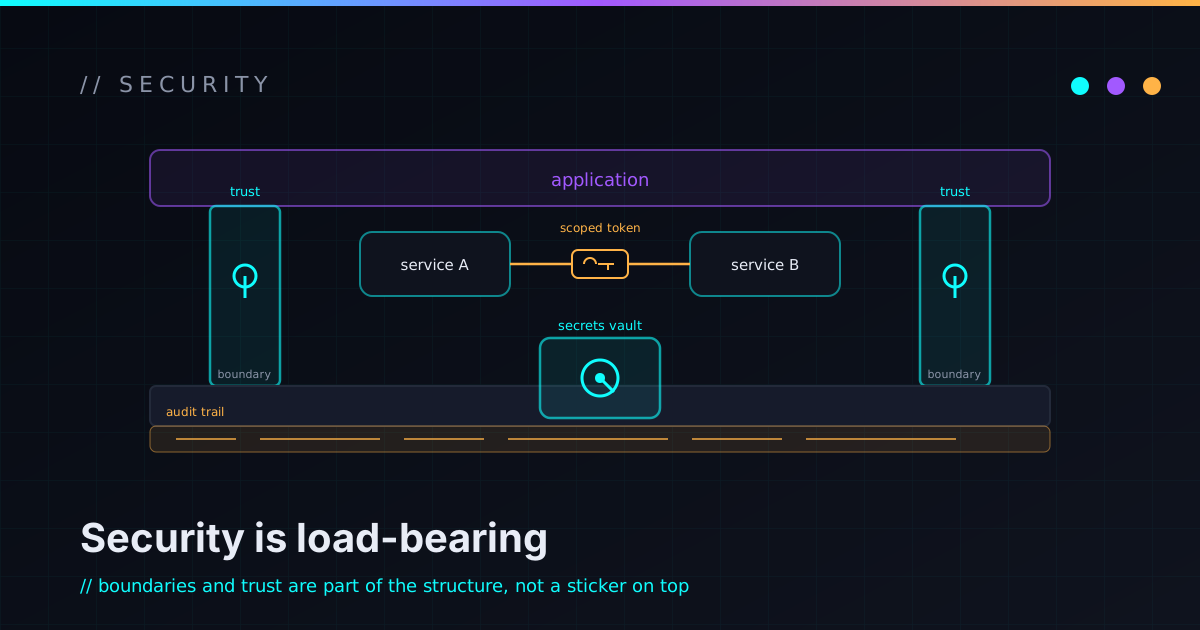
The fastest way to spot bolt-on security is to ask where it lives. If the answer is “there’s a ticket for it near the end,” it’s decoration — a coat of paint over a structure that was never designed to be safe. Real security isn’t a layer you add. It’s a property of how the system is shaped: its boundaries, its deploy path, where its secrets live, and what it writes down when something happens. You get that by designing for it up front, or you mostly don’t get it at all.
Decoration fails because it can’t reach the real surface
Bolt-on security operates at the wrong altitude. By the time you’re adding it, the boundaries are already drawn, the credentials already flow through six places, and the deploy path already trusts things it shouldn’t. So the “security work” becomes a scramble to wrap controls around decisions that were made without security in mind — a WAF in front of an app that trusts every input, a secrets manager that three services route around anyway.
If security is the last thing you design, it’s the first thing that breaks.
The structural stuff — who can talk to whom, what runs with what privileges, where trust changes hands — is set early and expensive to move later. That’s exactly why it has to be a design input, not a finishing touch.
Trust boundaries are the actual design
A trust boundary is any place where data or control crosses from “I made this” to “someone else did.” The internet to your app. Your app to its database. One service to another. A user-supplied string to a shell command. Drawing those lines deliberately — and deciding what’s allowed across each one — is most of what security architecture actually is.
The discipline is simple to state and easy to skip:
- Name every boundary instead of letting them happen by accident.
- Validate and minimize what crosses each one — assume the other side is hostile or just buggy.
- Keep the messy, untrusted work behind a clean interface so it can’t leak.
That last instinct is the same one behind NexusPort: provider-specific mechanics stay behind an adapter so the dangerous part has exactly one door, and that door is watched.
Least privilege is a posture, not a setting
Least privilege means every component gets the narrowest access that still lets it do its job — and nothing more. It’s not a checkbox you flip once; it’s a default you keep defending, because the path of least resistance is always “just give it admin so the error goes away.”
The payoff is blast radius. When a service is compromised or simply misbehaves, least privilege decides whether you’re cleaning up one small mess or explaining a big one. A token that can only read one bucket can only ruin your day so much. A god-mode credential turns any small failure into a total one.
Secrets want to leak — so isolate them
Credentials are the most portable, most dangerous thing in your system, and they escape through the dullest paths: a config file in the repo, a value echoed into shell history, a key pasted into a screenshot, an API token baked into a client bundle. Secrets handling is architecture because where a secret can exist is a structural decision.
The rules that earn their keep:
- Secrets live in managed secret storage, injected at runtime — never committed, never in command history.
PUBLIC_-prefixed or client-side values are not secrets and must never carry anything that is one.- Rotation is assumed, so nothing hardcodes a credential it can’t easily replace.
None of that is exotic, which is the point: it only works if it’s the default shape of the system, not a heroic cleanup you do after a scare.
Audit trails: you can’t review what you didn’t record
Security isn’t only prevention — it’s the ability to answer “what happened?” afterward without guessing. That means logging the events that matter (who did what, when, across which boundary) in a form you can actually search, and protecting those logs from the same actors they’re meant to catch.
A system you can’t audit is a system you can only hope about.
This is where security and operations stop being separate topics. The same visibility that lets you debug a 1am outage is what lets you reconstruct an incident — and the documentation around both is what makes the trail legible to the next person reading it cold.
Small projects and homelabs aren’t exempt
It’s tempting to think this is enterprise stuff — that a side project or a homelab is too small to bother. The opposite is true: small systems are where these habits get cheap to learn. Segmenting services that don’t need to talk, giving each container a narrow role, keeping credentials out of compose files, exercising a restore — the lab is a low-stakes place to make all of it automatic, so it’s already automatic when the stakes are real. The field notes from running mine are mostly this lesson, repeated until it stuck.
Build it in
The whole argument compresses to one habit: treat security as a design input, not a final inspection. Draw the boundaries on purpose, hand out the least privilege you can get away with, isolate the secrets, record what happens, and do it at the scale you’re actually working at — homelab or production, same shape. That’s not extra work bolted onto the architecture. It is the architecture.
If you want to see where this thinking shows up in real systems, the work page walks through the projects it shaped — and if you’d rather argue about trust boundaries over email, my inbox is open. Want it pointed at your own design? That’s a Security-Minded Architecture Review.