Automation
AI Automation for Small Business: How to Start Without Building a Haunted House
A practical guide to AI automation for small businesses: where to start, what to automate first, what to avoid, and how to build workflows that are secure, useful, and maintainable.
- AI Automation
- Small Business
- Workflow Automation
- Systems Design
- Consulting
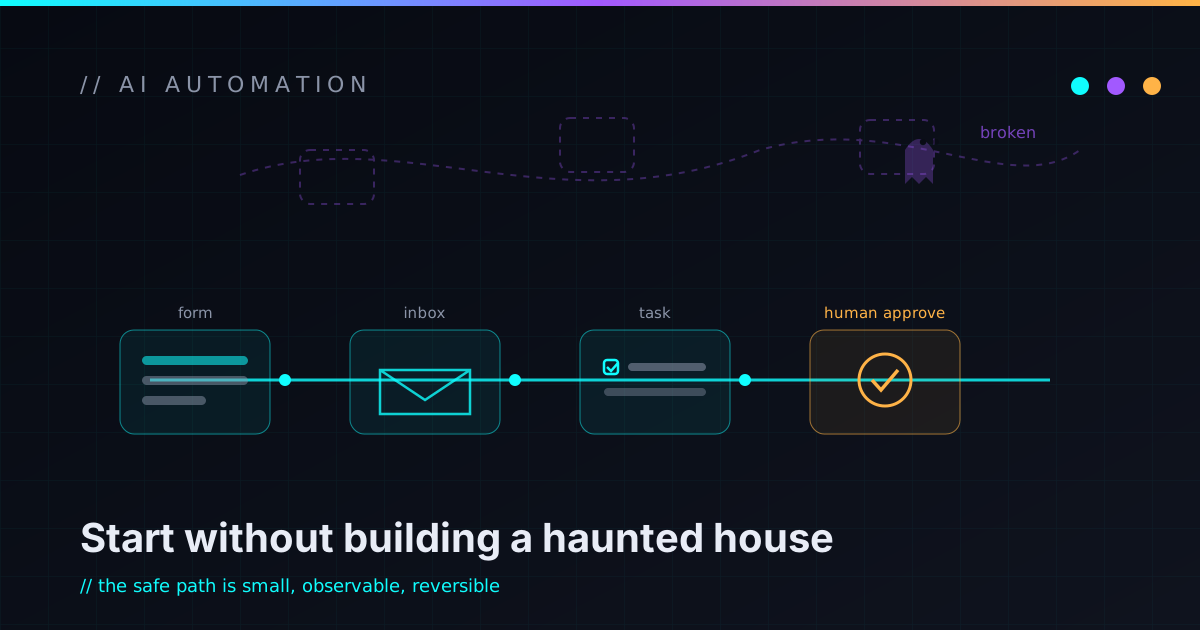
AI automation sounds amazing right up until it quietly becomes a pile of disconnected tools, half-working Zapier chains, mystery prompts, spreadsheet exports, duplicated customer records, and one workflow nobody wants to touch because “it mostly works.”
That is the haunted house version of automation, and a small business does not need it. What a small business needs is boring, useful leverage: fewer manual handoffs, fewer dropped follow-ups, cleaner data, faster responses, and systems that still make sense six months from now.
The goal is not to “add AI” everywhere. It’s to find the repetitive operational work that’s already costing you time and consistency, then design a workflow that handles the boring parts while humans stay in control of the decisions that matter. That’s where AI automation actually earns its keep.
What “AI automation” actually means for a small business
AI automation is not one thing. It is usually a few pieces working together:
- A trigger — a form submission, a new email, an invoice, a missed call, a support request, an uploaded file, or a CRM status change.
- A workflow that decides what should happen next.
- Integrations that connect the tools you already use: Gmail, Sheets, Slack, QuickBooks, HubSpot, Notion, Airtable, Stripe, or an internal system.
- AI steps that classify, summarize, draft, extract, or route messy information.
- Human approval for anything risky before it goes out or changes something.
- Logging so you can understand what happened when something breaks.
The AI part is often the smallest piece. The workflow design is the actual work. A bad automation says, “let the AI handle it.” A good one says: here’s the exact job, the inputs, the allowed actions, when a human must approve, the log, and how we turn it off. That difference is the whole article.
Start with the work that already has a pattern
The best first automation is not the flashiest one. It is the task your business already repeats constantly. Look for work with a clear, boring pattern:
- Every new lead gets reviewed, categorized, and followed up with.
- Every intake form needs the same fields copied into the same places.
- Every support request needs to be triaged and routed.
- Every invoice or order has fields someone extracts by hand.
- Every weekly report pulls from the same handful of sources.
If the task is repetitive, rules-based, and annoying, it might be a good candidate. If it is high-stakes, ambiguous, emotionally sensitive, or still changing every week, it is not where you start.
Automation works best when the process is already understood. If nobody can explain how the task works manually, automating it just makes the confusion faster.
Good first automations (and the magic word is “draft”)
Here are practical places most small businesses can start. Notice that the safe first version of each one prepares the work instead of taking the action.
Lead intake and follow-up. A new lead arrives through a form, email, or referral. Instead of sitting in an inbox, it gets summarized, classified, logged in the CRM, routed to the right person, and a reply gets drafted. That word matters — for the first version, let the automation prepare the message and let a human approve it. You keep the speed without the “a robot emailed a customer something weird” problem.
Support triage. Incoming messages get sorted by urgency, topic, and customer type — billing, technical, sales, cancellation risk, needs-a-human-now — then routed with a suggested response. A person still owns the conversation.
Document and invoice extraction. AI is genuinely good at turning messy documents into structured data — invoices, intake forms, estimates, job notes. The workflow pulls the vendor, amount, line items, and due date into a review queue, with confidence checks and human review for anything uncertain.
Meeting notes and action items. A useful meeting automation produces an operational artifact, not just a summary — decisions, open questions, and action items with owners and due dates. For small teams, that’s exactly where follow-through breaks down.
What not to automate yet
Some workflows are bad first projects, and picking one is how you end up in the haunted house:
- Don’t start with fully autonomous customer communication. Let AI draft before it sends.
- Don’t start with money or account changes — refunds, discounts, cancellations, anything that hurts a customer or the business if it goes wrong.
- Don’t connect ten tools at once. Every integration adds a failure mode.
- Don’t start with a process nobody understands. Automation is not a substitute for clarity.
- Don’t start with “we need an AI agent.” Start with the business problem.
Failed projects begin with a tool. The better path begins with a workflow — the same instinct behind shipping small slices instead of one big-bang build.
Score the workflow before you build it
Before building anything, score the candidate. Run through eight questions:
- How often does this happen?
- How long does it take manually?
- How consistent is the process?
- How expensive is a mistake?
- How easy is it to review the output?
- Does it need private or sensitive data?
- Can we undo the action if it goes wrong?
- Can a human approve the risky step?
Great first projects happen often, follow a repeatable pattern, and have low-risk, easy-to-review outputs. Risky ones involve sensitive data, customer-facing actions, money movement, or hard-to-reverse decisions — not never-automate, just needs-more-design-first.
Security is part of the design, not a bolt-on
Small businesses sometimes assume security only matters for enterprise automation. It is the other way around. Small businesses usually have fewer layers of review, fewer dedicated IT people, and more shared access between tools — so a bad automation can do a lot of damage fast.
Start from least privilege: give a workflow access to only what it needs. If it only needs to read one inbox label, don’t hand it every mailbox. If it only needs to write to one sheet, don’t give it the whole drive. If it only needs to draft messages, don’t let it send them. The same least-privilege posture that matters everywhere bites harder here, because a script won’t pause before doing something dumb.
Then build the off-ramps before the engine — the same discipline I wrote about in Automation Needs a Panic Button:
- Dry-run mode that shows what would happen before anything acts.
- Audit logs that record what ran, with what inputs, what it decided, and what it changed.
- Human approval gates on the actions that actually matter.
- A rollback path so run #500 going wrong is recoverable, not a rebuild.
- A kill switch a tired human can reach under stress.
Be deliberate about what data you send to a model, too — customer records, financials, credentials, and contracts all need extra care. Security isn’t just “don’t get hacked”; it’s designing the workflow so mistakes have a small blast radius. (How I handle access and data on an engagement lives on the trust page.)
Keep a human in the loop — at first
The safest first version of most AI workflows is not full autonomy. It’s assisted execution: the system does the repetitive preparation — reads the input, extracts the fields, drafts the response, creates the task — and a human reviews and approves. You get immediate time savings while you build trust. Over time the parts that prove reliable can become more automated, and the sensitive parts stay on approval. That staging is how you avoid turning AI into a mystery employee with admin access and no manager.
Custom automation vs off-the-shelf tools
For many workflows, off-the-shelf is the right starting point — Zapier, Make, n8n, Airtable, HubSpot, or Google Apps Script, sometimes a feature already built into a tool you pay for. Custom automation starts to earn its cost when:
- The workflow touches multiple systems with messy rules.
- You need stronger validation, better logging, or real audit trails.
- You need a custom approval process or careful handling of sensitive data.
- You need the workflow to match how the business actually operates.
- You are tired of maintaining a pile of fragile one-off automations.
The best answer is often hybrid: use existing tools where they are strong, and add custom code where the workflow needs real engineering.
A first project that won’t come back to haunt you
If I were helping a small business start, I would not build a platform. I would build one workflow, in slices:
- Map the manual process — trigger, people, decisions, tools, where it breaks.
- Define the smallest useful version — not the dream, the first slice that saves time without adding risk.
- Build it with preview mode and logs.
- Run it against real examples without taking action.
- Add human approval.
- Let it run in a limited scope.
- Measure what changed, then expand only after the first slice works.
In practice, the smallest useful slice is usually a preparer, not an actor: the lead workflow that drafts a reply but never auto-sends, or the invoice workflow that fills a review queue but never pays anything. High confidence lands in front of a human with the fields filled in; low confidence gets flagged. That distinction — prepares the work versus takes the action — is the difference between useful automation and an expensive surprise. It’s the same slice-first approach I use for everything else.
Why AI automation projects fail
Most projects don’t fail because the model wasn’t smart enough. They fail because the system around the model was never designed: no clear owner, no success metric, too many tools wired up too early, no logging, no rollback, no approval, and no testing against messy real-world examples.
AI doesn’t create operational maturity — it amplifies the process you give it. Clean process, faster results. Chaos, faster chaos.
The production-ready checklist
A workflow is not production-ready just because it ran once. Before you trust it, it should:
- Have a clear owner and a defined “this worked” signal.
- Have a dry-run or preview mode, and log what ran with what inputs.
- Require human approval for risky actions.
- Fail loudly instead of silently dropping work.
- Have a manual fallback and a kill switch.
- Use least-privilege access and never expose secrets in logs.
- Have documentation someone else can follow.
- Have a small set of real-world test examples and a maintenance plan.
The less exciting this list feels, the more important it probably is. (Treat the docs as part of the system, not an afterthought — documentation is infrastructure.)
When it’s worth bringing in help
You might want help if you know automation could save time but aren’t sure where to start — or if you already built some and they’re now hard to trust or change.
A good automation consultant shouldn’t open with “what tools do you use?” The better questions are: what work repeats every week, where do customers wait, where does information get copied by hand, which decisions need a human, and how will we know it worked? The job isn’t to throw AI at a business — it’s to turn messy operational work into a system people can actually operate. That’s the thinking behind the AI Automation Lab and the kind of focused automation sprint listed among the ways I help and the work I take on.
FAQ
What is AI automation for small business?
It means using AI-assisted workflows to handle repetitive tasks like lead intake, support triage, document extraction, reporting, meeting notes, and internal knowledge lookup. The best systems combine automation, integrations, and human approval instead of giving AI unlimited control.
What should a small business automate first?
Start with frequent, low-risk, repetitive work — lead routing, form intake, meeting summaries, support categorization, invoice extraction, internal reporting. Avoid high-risk financial, legal, or customer-facing decisions until the workflow is well tested.
Do I need custom software for AI automation?
Not always. Many workflows can start with tools like Zapier, Make, n8n, Airtable, HubSpot, or Google Workspace. Custom software makes sense when you need stronger validation, custom business logic, better audit logs, sensitive-data handling, or integrations off-the-shelf tools don’t support well.
Is AI automation safe?
It can be, when it’s designed with boundaries: least-privilege access, human approval for risky actions, logging, dry runs, rollback paths, and clear documentation. The unsafe version is giving an AI tool broad access and letting it act without review.
Will AI automation replace my employees?
That shouldn’t be the goal. The practical aim is to reduce repetitive manual work so people spend more time on judgment, customers, and the work that actually needs a human. AI is most useful when it supports people, not when it quietly becomes an unmanaged decision-maker.
Build the boring system first
The best automation doesn’t feel magical after it ships — it feels obvious. A request came in, it went to the right place, the right person had the right context, the draft was ready, the data was clean, the log made sense, and nothing got lost. That’s the win.
Small businesses don’t need haunted houses of fragile workflows. They need maintainable systems that save time without creating new anxiety. Start with one workflow. Make it visible, make it reviewable, make it safe — then improve it one slice at a time. That’s how weird ideas turn into real systems.
If you want help mapping a workflow like this, I turn messy operational work into real, maintainable automation. If you have a process that feels repetitive, fragile, or ready for a better system, reach out and I’ll help you think through the first slice.