Websites
Service Landing Pages for Small Businesses: How to Turn What You Do Into Pages That Rank and Convert
A practical guide to building small business service landing pages that explain your offer, support SEO, build trust, and turn visitors into leads.
- Service Pages
- Technical SEO
- Small Business
- Website Strategy
- Landing Pages
- Conversion
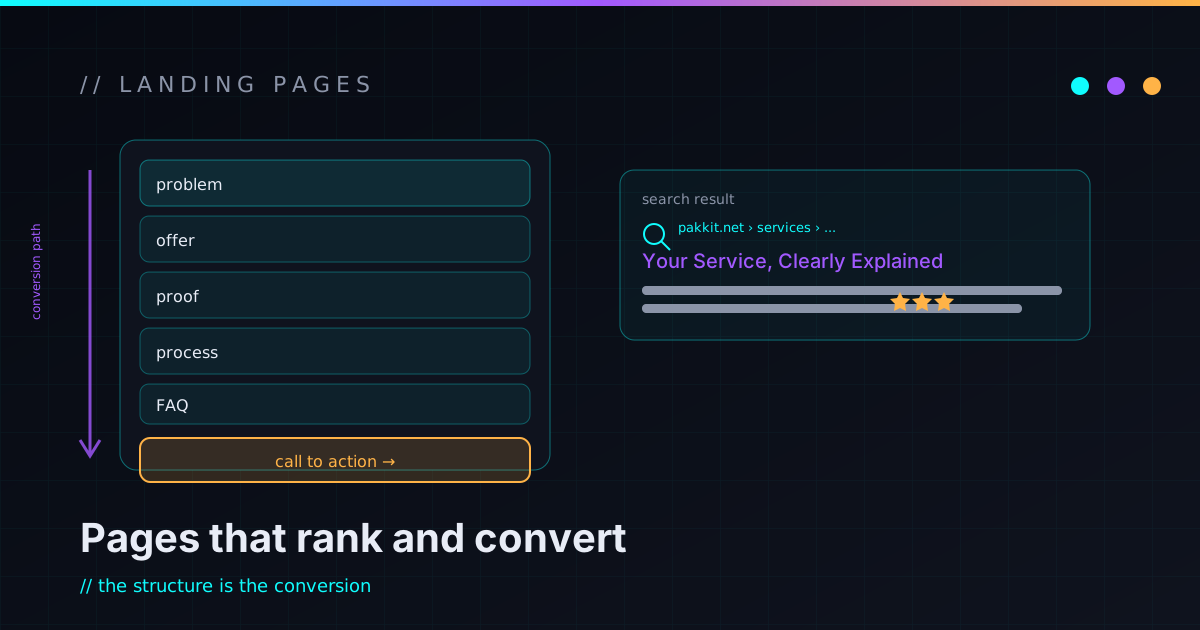
Most small business sites are built the same way: a homepage, an about page, a contact page, and one “Services” page that tries to describe everything the business does in a few short paragraphs. That layout works fine for someone who already knows you and just needs your phone number. It works badly for the person who is searching for one specific thing, comparing two or three options, and trying to figure out — in about five seconds — whether you solve their exact problem.
A dedicated service landing page fixes that by giving a single offer room to breathe. Instead of one page mumbling “we do websites, automation, security, consulting, and support,” you build one focused page per service you actually want to sell — one for website audits, one for static rebuilds, one for automation work. Each can match a specific search, explain a specific problem, and point at one clear next step. That’s better for the person reading it, and — not coincidentally — better for the search engine deciding what the page is about.
One generic services page is a directory, not an answer
A combined services page is a fine directory. It can list what you offer and route people to the right place. What it can’t do is rank or convert well for any specific service search, because it has to stay broad to cover everything.
Search intent is narrow. Someone typing “small business website audit” is in a different headspace than someone typing “custom workflow automation” or “static site rebuild.” Those are three different problems, three different moments, three different next steps. Squeeze them onto one page and each gets a couple of sentences — not enough depth to be the best answer to any of them. Split them onto dedicated pages and each one gets to be the focused, obviously-relevant result for a real problem someone is already searching for.
The boundary is the whole point. One page, one service, one intent. That constraint is what makes the page legible to both a human skimming on their phone and a crawler trying to classify it.
Homepage, services index, and service page do different jobs
These three page types get confused constantly, usually by trying to make the homepage do all three jobs at once.
The homepage is the front door. It says who you are, who you help, why you’re credible, and where to go next. It is deliberately broad.
The services index is the map. It lists the main services, groups them, and routes people to the right dedicated page. On this site that’s the services overview — it exists to send you somewhere specific, not to close the deal itself.
A service landing page is the focused conversation. It goes deep on one service and one type of problem: what’s broken, who it’s for, what’s included, what isn’t, how the process runs, and how to start. The dedicated pages here — like technical mentorship and AI workflow architecture — are built exactly this way, as standalone answers rather than blurbs.
Each layer supports the others. The failure mode is asking the homepage to be all three.
A service page is a structured answer, not a pitch
A good service page should sell, but it shouldn’t read like a pitch. It should quietly answer the questions a prospect is already asking before they’ll reach out:
- Is this the service I actually need?
- Does this person understand my problem?
- What’s included, and what’s explicitly not?
- What does the process look like after I make contact?
- What do I walk away with?
- Why should I trust this?
- What do I do next?
A page that just says “contact us today for world-class solutions” answers none of those. A page that explains the work clearly does something more useful than persuade: it lets the right person feel confident and lets the wrong person self-select out before they fill in a form. Filtering bad-fit leads is a feature, not a loss.
Start from services you can actually deliver
Before you build a page, be honest about whether the service behind it is real. SEO makes people weird about this — the moment a page might rank, there’s a temptation to spin up a page for work you don’t really want to do. Don’t. A page that ranks is a page that generates contact requests, and if you can’t deliver what it promises, the page becomes a liability instead of an asset.
Run each candidate through a quick gut check: Is this something I actually want to offer? Can I describe the outcome in plain language? Can I deliver it repeatedly, not just once? Do I know who it’s for — and who it isn’t? Can I back it up with real experience, projects, or writing? If someone emailed about it tomorrow, would I be glad? If the answer is no, the page isn’t ready. Useful pages have to match services the business can genuinely deliver.
Match each page to one primary intent
Search intent is just what the visitor is trying to accomplish. For service pages it tends to fall into three layers:
- Informational — “what is a website audit,” “how does automation work for a small business.” People learning.
- Commercial investigation — “WordPress alternative for small business,” “custom software vs SaaS,” “website audit checklist.” People comparing.
- Transactional — “hire a website performance consultant,” “small business site rebuild.” People ready to act.
A strong page can serve more than one layer, but it needs one primary focus. If the page exists to sell a service, don’t make it purely educational — teach enough to build trust, then make it unmistakable that the service is available and how to start it. The visitor should never have to guess whether they can actually hire you for the thing the page describes.
The shape of a service page that works
You don’t need anything clever here. A service page that converts is usually just these sections, in roughly this order:
- Hero — the offer, made obvious.
- The problem — what’s broken, slow, risky, or expensive, and why it matters.
- Who it’s for — and, just as importantly, who it isn’t.
- What’s included — concrete deliverables and scope.
- What’s not included — boundaries that prevent bad-fit leads.
- Process — what actually happens after they contact you.
- Trust signals — proof you can do the work.
- Related reading and projects — depth, and a path for people who aren’t ready yet.
- FAQ — the objections people raise before buying.
- A clear CTA — one obvious next step.
Each section has a job. The hero makes the offer legible. The problem section proves you understand the pain. “Who it’s for” helps the right reader feel seen. The included / not-included pair kills ambiguity. The process removes fear of the unknown. The rest reduces risk and gives people somewhere to go. None of it is magic — it’s just respecting the reader’s time.
Make the hero and the problem do real work
The hero is not the place to be vague. “Modern solutions for digital growth” tells the reader nothing. “Website audits for small businesses that need a faster, clearer, more trustworthy site” tells them the service, the audience, and the outcome in one line. Name the service, who it’s for, the main problem, and the main result, then give one primary call to action.
Then, before you sell anything, make the problem visible — people buy services to make a problem go away, not because they wanted another vendor. For a website audit the problem is usually concrete: the site is slow, the contact form quietly drops messages, search traffic is flat, the offer is unclear, pages are missing metadata, and nobody actually knows what’s broken. Written down in the reader’s own words, the service stops feeling like a sale and starts feeling like a fit.
Concrete deliverables and honest boundaries
The most common service-page mistake is describing vibes instead of deliverables. “Improve your digital presence” means nothing. “A prioritized audit report covering speed, technical SEO, security basics, accessibility, analytics, and conversion paths, plus a ranked fix list” means something. Spell out what the buyer actually receives — a report, a fix list, an implementation plan, a built page, a workflow map, documentation, a follow-up review — so they can picture the thing they get.
Then do the part most pages skip: say what’s not included. A website audit isn’t a full redesign unless that’s scoped separately. A security review isn’t a formal compliance certification. A first automation build probably isn’t fully autonomous on day one. Stating boundaries plainly makes the offer more trustworthy, not less, and it quietly screens out the leads who’d be disappointed anyway. Good positioning is mostly the discipline of saying yes to the right work and a clear no to the wrong work.
Trust signals you can actually back up
Trust signals don’t have to be invented awards or stock-photo testimonials. For an independent or small operation, the most credible proof is the work itself: relevant project pages, technical writing that shows how you think, a clear process, real contact details, named skills, and honest limitations. Before-and-after examples and screenshots work too — when they’re real.
On a personal technical site, a lot of the trust is carried by the writing. If a visitor reads a few paragraphs and thinks “this person actually understands the work,” that does more than any badge. The work page here is the proof layer; the blog is the “how I think” layer. Both beat pretending to be bigger than you are.
Technical SEO is table stakes
A service page should be technically clean. That’s not exotic, it’s just not skipping the basics: a unique title and a useful meta description, one clear H1, a sensible H2/H3 outline, a clean canonical URL, Open Graph tags, sitemap inclusion, fast load, a mobile-friendly layout, descriptive internal link text, image alt text, and no accidental noindex. Don’t create two pages targeting the exact same intent — they’ll compete with each other.
Schema markup helps where it’s genuinely true: Service markup for the offer, FAQPage markup for a real FAQ section, BreadcrumbList for navigation. It won’t conjure rankings, but it gives search engines a cleaner read of the page. The deeper win is structural — on a static, component-driven setup you can template these pages so the metadata, schema, and layout are correct by default instead of hand-maintained one page at a time. That same boundaries-and-defaults instinct shows up in how I treat security: get the shape right once, and every page inherits it.
Local service pages without the spam
Local pages can help when location genuinely matters — a service area, local trust, in-person availability. The trap is generating dozens of near-identical city pages with the town name swapped in. That’s thin, obvious, and exactly what search engines have spent years learning to ignore.
If a local page earns its place, give it real local substance: the actual service area, local context, honest local examples, and a clear statement of how remote-versus-local works. If the work can be done remotely, say so plainly. Clarity beats keyword stuffing every time.
A service page template you can fill in
Here’s a working template. Treat it as a checklist, not a straitjacket:
- Title:
[Service] for [Audience] - Hero: one-sentence offer, the main outcome, a primary CTA, an optional secondary CTA.
- Problem: what’s broken, slow, risky, or repetitive — and why it matters.
- Who it’s for: good-fit businesses and situations, plus when it’s not the right fit.
- What’s included: concrete deliverables, scope of the review/build/fix, and the handoff.
- Process: discovery → audit or planning → build or fix → review → launch or handoff → follow-up.
- Trust: relevant experience, related writing, related projects, and honest limitations.
- FAQ: timeline, pricing approach (if you share one), what you need from the client, whether existing systems can be reused, maintenance options, next steps.
- CTA: a clear invitation to make contact and a one-line description of what happens next.
If you can fill every line of that honestly, you have a real page. If you can’t, you’ve found the part of the offer that still needs work — which is useful to know before you publish.
What you can do yourself, and when to call in help
You can get a long way before hiring anyone, because most of the early work is writing, not code. Write plain answers to: what service does this page sell, who’s it for, what problem does it solve, what does the customer get, what does the process look like, what do people ask before buying, and what should the visitor do next. Then open the page on your phone. Can you understand the offer in five seconds? Can you find the CTA? Does it answer the obvious objections? Does it sound like a person wrote it? Fix the clarity before you touch anything technical.
Bring in technical help when the problem stops being words and starts being structure: when you need several pages built consistently, correct metadata and schema, fast performance, reusable components, a content collection or template system, redirects from old URLs, analytics events, or pages wired to forms and automation — or when you don’t know which services deserve a dedicated page. A good build setup makes pages easier to publish, update, link, and maintain, which matters a lot if content is part of how the business grows. The same logic applies to anything you’d automate around lead handling: get the boundaries right, then let the system carry the repetition.
If your site is one tired services page trying to do six jobs at once, that’s a fixable problem — and a good first slice. I help small businesses and technical founders turn fuzzy service offerings into fast, clear, SEO-friendly pages that are easier to understand, maintain, and improve. If you want a hand planning or building dedicated service pages, reach out and we’ll figure out the first practical slice together — small, shippable, and real, the way I prefer to build everything.
FAQ
What is a service landing page?
A service landing page is a dedicated page focused on one specific service. It explains the problem, who the service is for, what’s included, how the process works, and what the visitor should do next — rather than summarizing everything a business offers on a single shared page.
Do small businesses need separate service pages?
Usually, yes. A combined services page is a useful directory, but dedicated pages are better for explaining specific offers in depth, matching specific searches, and giving visitors one clear next step. The deciding factor is whether each service is real and distinct enough to deserve its own page.
Are service pages good for SEO?
Service pages can support SEO when they match real search intent, answer the reader’s questions, use clean metadata, load fast, link sensibly to related pages, and go deep on one specific service. They don’t guarantee rankings on their own — no honest page does — but they give a search engine a clear, focused thing to understand.
How long should a service page be?
Long enough to answer the visitor’s real questions and no longer. For most small business services that means sections for the problem, the audience, deliverables, process, trust, an FAQ, and a CTA. Clarity matters far more than hitting a word count.
Should every service have its own page?
Only build dedicated pages for services you actually want to offer and can explain clearly. A thin page for a service you don’t really sell — or can’t reliably deliver — isn’t an SEO win, it’s a maintenance burden and a source of bad-fit leads.
What should be included on a service page?
A strong service page usually includes a clear headline, a problem statement, who it’s for, what’s included and what isn’t, the process, deliverables, trust signals, related links, an FAQ, and a clear contact CTA. The template earlier in this post is a usable checklist for exactly that.