Automation
AI Agents for Small Business: Useful Automation or Expensive Chaos Machine?
A practical guide to AI agents for small businesses: what they are, when to use them, when not to, and how to build safe human-in-the-loop workflows with logging, approvals, and guardrails.
- AI Agents
- AI Automation
- Small Business
- Workflow Automation
- Systems Design
- Consulting
AI agents sound like magic right up until you ask one simple question:
“What exactly is this thing allowed to do?”
That is where the conversation gets real.
For a small business, an AI agent can be genuinely useful. It can summarize messy requests, route leads, draft replies, extract fields from documents, monitor workflows, create tasks, and help people move faster.
It can also become an expensive chaos machine — one with access to too many tools, unclear instructions, no approval process, no logs, and no way to explain why it did something weird.
The difference is not whether the AI is smart. The difference is whether the system around it was designed.
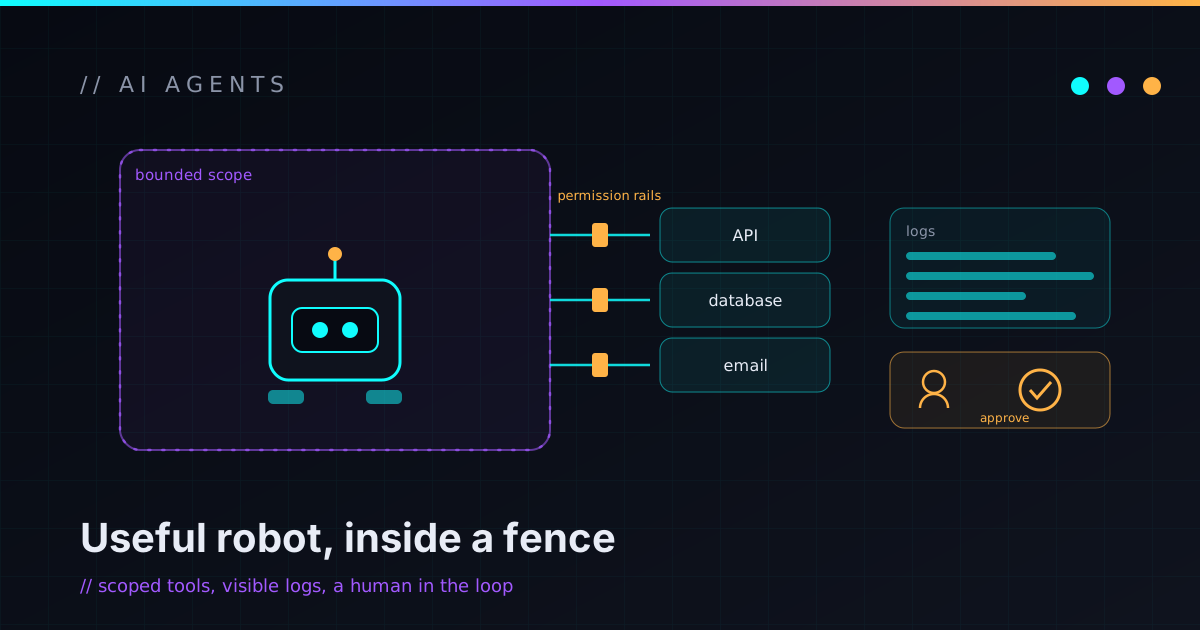
A good AI agent workflow has boundaries, permissions, logs, human approval, fallback paths, and a specific job. A bad AI agent workflow is basically “let the robot figure it out.” That is not a strategy. That is a haunted house with API access.
What is an AI agent?
An AI agent is software that uses an AI model to reason through a task and take actions through tools.
That might mean reading an email, checking a CRM, summarizing a customer request, creating a task, drafting a reply, updating a spreadsheet, searching internal documents, or calling an API.
The “agent” part usually means it can do more than generate text. It can make decisions inside a workflow and use tools to complete steps.
In plain business terms:
- An AI chatbot answers questions.
- An AI automation follows a defined workflow.
- An AI agent can inspect a situation, choose from allowed actions, and move the workflow forward.
That can be powerful. It can also be risky if the agent has too much freedom.
AI agents are not the same as normal automation
Normal automation is usually predictable. When a form is submitted, create a CRM record, send a notification, and add a task. That workflow does not need much reasoning — it is mostly rules and integrations.
AI-assisted automation adds AI to a defined step. When a form is submitted, summarize the request, classify the lead type, draft a response, then create a task for a human to review. The workflow is still controlled; AI just helps with the messy language parts. That middle ground — assisted, not autonomous — is most of what I describe in AI Automation for Small Business, and it’s where most businesses should actually start.
An AI agent has more flexibility. When a new request arrives, it inspects the message, checks customer history, identifies the likely category, decides whether more information is needed, drafts a response, creates a task, and flags urgent cases. That can be useful when the input is messy and the path is not always identical — but more flexibility means more need for guardrails.
Start with the workflow, not the agent
A lot of AI projects go wrong because they start with the sentence, “We need an AI agent.” Maybe you do. Maybe you do not.
A better starting point is: “What workflow are we trying to improve?” Then ask:
- What starts the workflow?
- What information is needed?
- What decisions happen, and which are repetitive versus judgment calls?
- Which systems are involved?
- What actions are safe, and what actions are risky?
- What should require approval, and what should be logged?
- What happens when the AI is wrong?
If you cannot describe the workflow manually, an AI agent will not magically make it clean. It will just make the confusion faster.
When AI agents are useful
AI agents are most useful when the work is repetitive but not perfectly rigid — when the input is messy, the next step depends on context, and a human currently spends time figuring out what should happen. Good candidates include:
- Lead triage
- Support routing
- Internal research and knowledge-base lookup
- Document extraction
- Meeting follow-up and report preparation
- CRM cleanup
- Task creation
- Workflow monitoring
- Drafting customer replies
- Flagging exceptions for review
These tasks involve language, context, and judgment — exactly where AI can help. The important part is that help does not have to mean full autonomy. Many good AI agent workflows start by preparing work for a human.
When AI agents are a bad idea
AI agents are a bad first choice when the task is high-risk, poorly understood, or easy to solve with simpler automation. Don’t start with an AI agent when:
- A basic rule-based automation would work.
- The workflow changes every week.
- Nobody agrees how the manual process works.
- The action is financial, legal, medical, or highly sensitive.
- The agent would need broad admin access.
- Mistakes are hard to undo.
- There is no human review path and no logging.
- The data is messy and untrusted.
- The business wants “AI” but has not defined a problem.
An AI agent is not a substitute for process design. If a simple form, checklist, script, or automation can solve the problem, use that. Complexity should earn its place — and sometimes the honest answer is that you don’t need an agent at all, you need the right off-the-shelf tool or a small custom build.
Example: lead triage agent
A lead triage agent helps when a business receives inquiries from different sources and needs to respond quickly. A new contact form submission arrives; the agent reads the request, summarizes it, identifies the service category, estimates urgency, checks whether the message includes enough information, and drafts a response. Then it creates a task for a human, including:
- Lead summary and suggested category
- Missing information
- Draft response and recommended next step
- Confidence level
- A link to the original submission
The first version should not auto-send. It should prepare the follow-up so a human can approve, edit, or reject it. That is useful automation without handing the entire customer relationship to a robot.
Example: support routing agent
Support requests are messy. Customers describe the same issue ten different ways. Some messages are urgent, some are billing questions, some are technical, some are sales in disguise, and some are just incomplete.
A support routing agent can classify requests — billing, technical, account access, new sales inquiry, existing-customer escalation, bug report, spam, or needs-immediate-human-review — then summarize the issue, pull relevant context, and suggest a reply. The risky part is letting it resolve or close requests automatically. A safer first version routes and drafts. Humans decide.
Example: document extraction agent
Many businesses deal with messy documents — invoices, PDFs, intake forms, contracts, estimates, scanned notes, vendor paperwork — full of data someone has to copy by hand. A document extraction workflow can pull out structured fields: vendor, customer, date, due date, invoice number, amount, line items, account number, service address, contact details, required next action.
But extraction needs validation. The system should show the original document, the extracted fields, the confidence, and any missing values, and a human should review uncertain or high-impact records. The agent should not silently push questionable data into accounting, billing, or customer systems.
Example: internal research agent
An internal research agent helps answer questions using approved business documents: “What is our onboarding process for this type of customer?” “Which services include monthly maintenance?” “Where is the latest pricing note?” “What did we decide about this vendor?”
This saves time, but it needs boundaries. A good internal research agent searches only approved sources, cites or links to the source material, says when it does not know, avoids inventing policies, avoids answering from untrusted documents, respects permissions, and logs important queries when appropriate. The goal is not to create an oracle — it’s to make internal knowledge easier to find.
Example: workflow monitoring agent
An AI agent can also watch for things that look wrong: a lead that hasn’t been followed up with, a quote waiting too long for approval, an urgent-but-unassigned support ticket, a failed workflow, a report with unusual values, a request missing required information, an automation that errored, a high-priority task that’s overdue.
This is one of the safer and more useful patterns, because the agent isn’t taking risky action — it’s noticing, summarizing, and escalating. For small teams where work gets scattered across email, chat, forms, task boards, and spreadsheets, that alone can be a big win.
Start in draft mode
The safest first version of most AI agent workflows is draft mode. The agent prepares work but does not execute risky actions automatically.
It can summarize, classify, extract, draft, recommend, create a review task, flag missing information, and suggest next steps.
It does not send customer messages, approve refunds, change billing records, delete data, modify permissions, make legal decisions, or commit irreversible changes without review.
Draft mode lets the business build trust. After the workflow has enough real examples, you can decide whether some low-risk actions should become automatic. Autonomy should be earned, not assumed — the same instinct behind the dry-run-first discipline I bring to any automation.
Human-in-the-loop is not a weakness
Human approval is not a failure of automation. It is how you build safe automation. A good human-in-the-loop workflow makes review easy. The human should see what the agent read, what it decided, why it made that recommendation, what action is proposed, what data will change, what message will be sent, what confidence level or warning exists, and how to approve, edit, reject, or escalate.
The human should not have to reverse-engineer the agent’s thinking from a vague output. The workflow should make the decision visible. That is how AI becomes useful instead of creepy.
Permissions and blast radius
An AI agent should not have access to everything. Give it the least access needed to do the job. If it only needs to read new form submissions, don’t give it full email access. If it only needs to draft replies, don’t let it send them. If it only needs to create tasks, don’t let it edit customer billing. If it only needs one folder, don’t give it the whole drive.
Permissions should match risk. Ask what this agent can read, write, delete, send, and change; what systems it can access; what data it can expose; what happens if it behaves incorrectly; and what happens if the account is compromised. The least-privilege posture that matters everywhere bites harder with an agent, because it won’t pause before doing something dumb. The goal is to reduce the blast radius: when something goes wrong, it should be annoying, not catastrophic.
Logs, audit trails, and rollback
AI agent workflows need logs — not just for debugging, but for trust. A useful log answers: what triggered the workflow, what data was used, what the agent output, what action was proposed, who approved it, what action was taken, when it happened, whether anything failed, and whether anything was changed afterward.
For important actions, audit history matters. If a customer record changed, you should know why. If a message was sent, you should know who approved it. If the agent extracted invoice data, you should be able to compare it to the original document.
Rollback matters too. Before letting an agent change anything, ask how that action can be undone. If it cannot be undone, it probably needs human approval — and it definitely needs the kind of kill switch and panic button a tired human can reach under stress.
Security and data privacy
AI agents often touch sensitive business data: customer messages, invoices, contracts, internal notes, support requests, credentials, operational records. Before building, decide what data can be sent to the AI model, what should be masked or excluded, which vendor processes the data, where it’s stored, whether prompts or outputs are logged, who can see those logs, how long data is retained, how secrets are protected, and whether the whole thing follows least privilege.
Small businesses don’t need enterprise security theater, but they do need practical security. Don’t copy sensitive data into random tools without understanding what happens to it. Don’t put API keys in prompts. Don’t let the agent leak private information into logs or notifications. The boring security details matter — the same foundation covered in the small business cybersecurity checklist, and the way I handle access and data on an engagement lives on the trust page.
The AI agent decision checklist
Use this before building.
An AI agent might be a good fit when the workflow happens often, inputs are messy or language-heavy, a human currently spends time classifying or summarizing, the next step depends on context, the action can start in draft mode, outputs are easy to review, mistakes are reversible or low-risk, the workflow has a clear owner, the required tools and data sources are known, logs can be captured, and permissions can be limited.
A normal automation might be better when the workflow is predictable, the rules are simple, the data is structured, no reasoning is needed, and the same action happens every time.
Don’t automate yet when nobody understands the process, the data is unreliable, mistakes are expensive, the agent needs broad admin access, there is no approval path, there is no fallback, or the only goal is “use AI somehow.”
Good automation starts with a real workflow.
How to implement AI agents safely
A practical implementation plan looks like this:
- Map the manual workflow.
- Identify the smallest useful AI-assisted step.
- Define allowed inputs and outputs.
- Decide what the agent can read.
- Decide what the agent can write.
- Start in draft mode.
- Add human review.
- Log every important step.
- Test against real examples.
- Add failure handling.
- Limit permissions.
- Monitor results.
- Automate only the low-risk parts that prove reliable.
This is not as flashy as “deploy an autonomous AI workforce.” That is the point. Small businesses need systems they can trust, not demos that collapse when the input gets weird.
What business owners can do before hiring help
Before asking someone to build an AI agent, document the workflow. Write down what task repeats often, who does it now, how long it takes, what tools are involved, what information is needed, what decisions happen, what can go wrong, what should require approval, what data is sensitive, what a good output looks like, what the agent should never do, and what would make the workflow trustworthy.
Then collect a few real examples. Real examples are more useful than abstract ideas because they show the messy edge cases. The best AI workflow is designed around actual work, not a perfect imaginary version of the business — which is the same way I approach the experiments in the AI Automation Lab.
When to bring in technical help
Bring in technical help when the workflow touches important systems, sensitive data, customer communication, money, permissions, or multiple tools. You may want help if:
- You want an AI agent but don’t know where to start.
- You need to choose between automation, SaaS, and custom code.
- You need human approval and audit logs.
- You need to integrate email, CRM, forms, task tools, or internal systems.
- You need safe AI workflows around customer data.
- You need to avoid giving AI too much access.
- You need a prototype before building a larger system.
- You need to turn a messy workflow into a maintainable process.
- You already built automations that nobody trusts.
A good AI agent consultant should not just ask, “Which model do you want?” They should ask, “What workflow are we making safer, faster, or easier to operate?” That’s the thinking behind my AI Workflow Architecture work and the rest of the projects I take on.
FAQ
What are AI agents for small business?
AI agents for small business are AI-assisted workflows that can inspect information, make limited decisions, and use approved tools to help with tasks like lead triage, support routing, document extraction, reporting, task creation, and internal research.
Are AI agents better than normal automation?
Not always. Normal automation is better for predictable, rule-based workflows. AI agents are more useful when inputs are messy, language-heavy, or context-dependent. The best solution often combines rules, automation, AI, and human approval.
Can AI agents send emails to customers?
They can, but the safer first version is usually draft-only. Let the agent draft the message, summarize the context, and recommend a response. A human should approve customer-facing messages until the workflow has proven reliable.
Are AI agents safe for business data?
They can be, when designed carefully. Use least-privilege access, avoid unnecessary sensitive data, log important actions, require human approval for risky steps, and understand how AI vendors handle prompts, outputs, and stored data.
What should a small business automate with AI first?
Start with frequent, low-risk, reviewable tasks such as summarizing leads, classifying support requests, extracting document fields, drafting replies, creating tasks, preparing reports, or flagging missing information.
Do I need custom software for an AI agent?
Not always. Some workflows can use existing automation tools. Custom software makes sense when you need stronger guardrails, specific integrations, audit logs, custom approvals, sensitive-data handling, or a workflow that off-the-shelf tools cannot model cleanly.
Make the agent earn trust
AI agents can be useful, but they should not be treated like magic employees. They are systems, and systems need design. Start with one workflow. Give the agent one clear job. Limit its permissions. Run it in draft mode. Keep humans in control of risky actions. Log what happens. Test real examples. Expand only after it earns trust.
That is how AI agents become useful automation instead of expensive chaos machines. A small business does not need an autonomous robot army. It needs reliable workflows that save time without creating new anxiety. Build the boring guardrails first — the magic works better when the system is sane.
If your business is curious about AI agents but you don’t want to hand your operations to a mystery robot, I help small businesses and technical founders turn AI agent ideas into safe, practical workflows with guardrails, approvals, logging, and maintainable implementation. If you want help finding the first useful AI workflow, reach out and I’ll help you map the first safe slice.