Operations
Small Business Technology Audit: Find the Mess Before It Finds You
A practical small business technology audit guide covering SaaS tools, accounts, access, security, automations, websites, backups, documentation, vendors, and workflow risk.
- Technology Audit
- Small Business
- IT Systems
- SaaS Audit
- Cybersecurity
- Workflow Automation
- Consulting
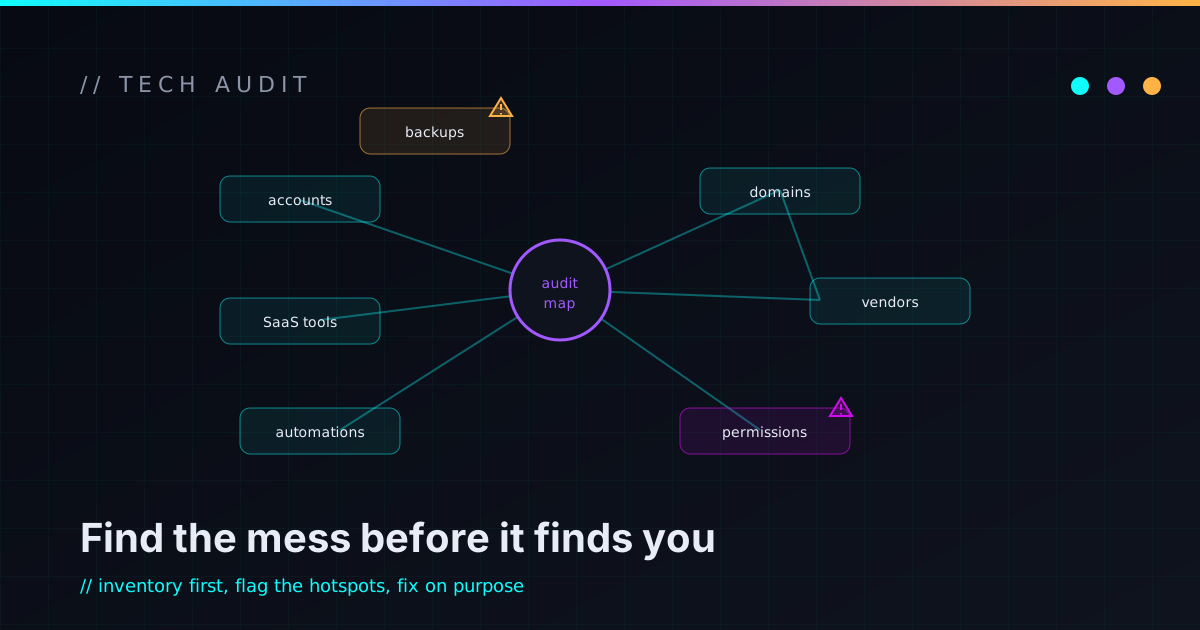
Most small businesses don’t decide to build a messy technology stack. It happens slowly. A new tool gets added because it solves a problem. A contractor gets admin access because they need to fix something. A spreadsheet quietly becomes the source of truth. A form sends leads to someone’s inbox. An automation gets built and forgotten. A subscription renews every year and nobody remembers why. The domain is registered under an old email. The backup process is “I think that’s automatic.”
The business keeps moving, so nobody stops to map the system. Then one day something breaks, and everyone realizes the company is running on a pile of tools nobody fully understands.
That’s where a technology audit helps — and not in the enterprise-theater sense. A small business audit isn’t about producing a giant report full of scary findings nobody can act on. The goal is plainer than that: figure out what exists, what matters, what’s risky, what’s redundant, what’s fragile, and what to fix first.
What a small business technology audit actually is
A technology audit is a practical review of the tools, accounts, workflows, vendors, automations, data, access, and infrastructure a business depends on. It answers the questions you’ve probably never written down in one place: What tools are we using? Who owns each account? Who has admin access? What systems hold customer data? What are we paying for? What automations are running? What depends on what? What happens if something breaks? Are backups working? Is MFA on the accounts that matter? Where do passwords live? Which tools are redundant? What needs documentation? What should we fix first?
A good audit turns a vague feeling of “our tech is kind of messy” into a clear map and a prioritized plan. That clarity is valuable on its own, before anything gets rebuilt. You can’t fix, secure, or simplify a system you can’t see.
Why small businesses accumulate technology mess
Technology mess usually comes from reasonable decisions made under pressure. The business needed a CRM, payments, forms, file storage, a couple of no-code automations — and someone wired each one up the day it was needed. Every decision made sense at the time.
The mess doesn’t come from adding tools. It comes from never circling back: no ownership, no documentation, no cleanup, no long-term design. That’s normal, and not a moral failure. The real problem is only that nobody has stopped to ask whether the whole stack still makes sense together.
SaaS sprawl: when every tool almost works
SaaS tools are useful, but too many disconnected ones become operational drag. Sprawl shows up as duplicate customer records, manual CSV exports, reports built by hand, old subscriptions nobody uses, two tools doing nearly the same job, staff unsure where the right data lives, and fragile automations gluing it all together.
The subscription cost is the part everyone notices, but it’s rarely the expensive part. The bigger cost is friction — people burning time checking multiple systems, reconciling conflicting data, and hand-gluing workflows that should connect on their own. An audit sorts the essential tools from the redundant ones, and flags the gaps where better integration would remove the manual glue.
Shadow IT, without the scary corporate framing
“Shadow IT” sounds like a villain group from a hacking movie. In a small business it usually means something much more ordinary: people built their own tools because they needed to get work done. A spreadsheet nobody else knows about. A personal cloud folder holding business files. A free SaaS account tied to someone’s personal email. A contractor’s automation. A shared login passed around in chat. A reporting workflow only one person understands.
This almost always happens because people are trying to help. But hidden systems create quiet risk. If that person leaves, the business can lose access or context. If the tool holds customer data, nobody knows how it’s protected. If the workflow fails, nobody even knew it existed to go looking.
The goal isn’t to punish people for solving problems. It’s to bring important systems into the light so they can be owned, secured, documented, or retired on purpose.
An audit should surface these without blame. Most shadow IT is just unmanaged helpfulness — and the fix is ownership, not finger-pointing.
Start with the tools that run the business
An audit begins with inventory. List the systems the business actually depends on: email, domain registrar, DNS, hosting, the website platform, contact forms, analytics, CRM, accounting, payments, payroll, file storage, the password manager, project management, support inbox or ticketing, scheduling, internal chat, automation tools, the spreadsheets and databases that quietly run things, any custom software or internal dashboards, vendor portals, social accounts, marketing tools, and AI tools.
For each one, capture the boring but decisive details:
- What it does, and who owns it
- Who has admin access
- How it’s billed
- Whether MFA is enabled
- What data it stores
- What other systems depend on it
- Whether it’s still needed
- How to export the data
- How to remove someone’s access
- What happens if it goes down
This doesn’t need to be fancy. A single spreadsheet or table is enough to start. The entire point is making the invisible visible — once it’s on one page, every later decision gets easier.
Audit access before it becomes a problem
Access control is one of the highest-value parts of an audit, and one of the most neglected, because reviewing it is tedious right up until it isn’t. Access accumulates: employees change roles, contractors finish projects, vendors get “temporary” access, shared logins appear because they were faster, and admin accounts stay admin forever because nobody wants to touch anything that’s working.
Walk the list deliberately. Who has access to each system? Who has admin rights? Which accounts are shared? Which users are inactive? Which vendors still have keys? Which former employees still exist somewhere? Which accounts lack MFA, or run on a personal email? And the high-stakes ones: who can reach customer data, change billing, or modify DNS, hosting, and website deployment?
The principle is least privilege — people get the access their job needs, not permanent access to everything. When someone leaves, access comes off quickly and shared credentials get rotated. None of this is paranoia; it’s basic operational hygiene, and it’s the same instinct behind a proper small business cybersecurity checklist.
Domain, DNS, and email deserve special attention
Some accounts matter more than others. Your domain registrar, DNS provider, and email platform usually sit at the top. Whoever controls your domain can redirect your website or interfere with mail. Whoever controls your email can reset passwords for nearly everything else.
So audit those keys to the kingdom first: who owns the registrar account, whether the domain auto-renews, whether MFA is on, whether the recovery email is current, who has DNS access, whether DNS records are documented, who administers business email, whether SPF/DKIM/DMARC are configured, whether old mailboxes are disabled, and whether any suspicious forwarding rules are hiding in an inbox. These are boring checks with outsized consequences. Protect them before polishing anything low-risk.
Website and hosting review
For most small businesses the website is the public front door, the lead-capture system, and the credibility layer all at once — so the audit should confirm it’s maintainable, not just that it looks fine today. Review the hosting and deployment process, the CMS or static-site setup, the contact form, analytics and Search Console, SSL, backups, admin users, and plugin or dependency status.
The questions that matter: Can the site be updated safely and rolled back? Do the contact forms actually deliver? Does anyone know how it’s deployed? Are analytics trustworthy and important pages indexed? Are old vendors still listed as admins? A site that looks healthy can still be fragile behind the scenes, and that fragility only shows up at the worst possible moment.
Automations and integrations need ownership
Automations are powerful, but forgotten ones are a liability. Audit every automation you can find — Zapier, Make, n8n, Apps Script, Airtable automations, CRM workflows, email rules, webhooks, custom scripts, scheduled jobs, AI workflows — and for each one document what triggers it, what systems it touches, what data it reads and writes, who owns it, where the logs live, what happens if it fails, and how to pause it.
A workflow that silently moves customer data, sends email, creates tasks, or touches billing should not be a mystery. If nobody owns it, it isn’t really finished — it’s just unattended. This is exactly the discipline I argue for in automation needs a panic button: every automation should have an obvious owner and an obvious off switch.
Data ownership and the source of truth
A lot of business pain traces back to not knowing which system owns which data. Is the CRM the source of truth for customer contact info, or is it the spreadsheet? Is the accounting tool authoritative for invoices? Is the website form just intake, or does it create live records? When two systems disagree, which one wins?
An audit should name the source of truth for each important data type. You don’t need perfect data architecture on day one, but you do need to know which systems are authoritative — that single decision prevents a surprising amount of duplicate records, bad reporting, and broken integrations down the line.
Backups and recovery
A backup is only useful if it can be restored, so treat this as more than a checkbox. Confirm what’s actually backed up, how often, where it’s stored, who can reach it, whether it’s protected from ransomware and deletion, and — the part everyone skips — whether a restore has ever been tested. Note what isn’t backed up, how long backups are retained, and who owns recovery.
This applies to websites, databases, files, accounting exports, and any custom system. And remember that sync is not backup: a cloud-synced folder will replicate a deletion, a corruption, or ransomware-encrypted files just as cheerfully as it syncs normal work. A backup you’ve never restored is a hope, not a plan.
AI tools belong in the audit too
AI tools are becoming part of operations fast, which means they belong in the inventory like anything else. Review which tools are in use, who has access, what data people are pasting into them, whether customer records are involved, whether prompts or outputs are stored, and whether the tools are connected to email, files, or the CRM in a way that lets them take real actions.
The goal isn’t to ban AI — it’s to use it on purpose. An AI assistant wired into sensitive systems with no human approval and no logs is just another shadow system with a lot of reach. If you’re heading toward connected AI workflows, do it deliberately; that’s the whole point of starting small and adding guardrails, which I cover in AI automation for small business.
Documentation gaps
An audit almost always uncovers documentation gaps, and that’s expected rather than embarrassing. Look for the missing pieces around system inventory, vendor accounts, admin access, website deployment, backup restore, automations, and the critical spreadsheets and internal tools nobody has written down.
Documentation doesn’t need to be huge — it needs to be useful, findable, current, and tied to real workflows. If a system is important enough to run the business, it deserves enough documentation that someone other than its creator can understand the basics. That’s the case I make in documentation is infrastructure: the docs aren’t paperwork, they’re part of the system that keeps working when a person is out.
Turn the findings into a prioritized roadmap
The output of an audit should not be a giant undifferentiated list of problems. It should be a roadmap, ordered by business impact, security risk, likelihood of failure, customer and revenue impact, operational friction, and how easy each fix is. A useful plan tends to fall into three buckets.
Immediate fixes — enable MFA on critical accounts, remove old vendor access, confirm domain ownership and auto-renew, test a backup restore, fix broken contact forms.
Near-term improvements — document the key systems, clean up unused subscriptions, review automations, fix analytics, tighten access control, consolidate duplicate tools.
Longer-term projects — replace a fragile spreadsheet with a real internal tool, build a proper integration between two systems, redesign a clumsy workflow, or move to a cleaner website architecture.
The point of the buckets is to make the next action obvious. A pile of problems is paralyzing; a short list of “do these three things this month” is something a busy owner can actually execute.
The practical small business technology audit checklist
Use this as a starting point and work through it in passes — you’re not finishing it in a weekend.
Inventory
- List every important SaaS tool.
- List domain, DNS, hosting, and website systems.
- List payment, accounting, CRM, and file-storage tools.
- List automation and integration platforms.
- List AI tools used in operations.
- List the spreadsheets and internal tools that quietly run things.
Ownership
- Identify an owner for each system.
- Identify the billing owner.
- Identify admin users.
- Identify vendor and contractor access.
- Flag systems tied to personal emails.
Security
- Enable MFA on critical accounts.
- Review shared accounts and reduce them.
- Remove inactive users.
- Rotate credentials after offboarding.
- Confirm password-manager usage.
- Secure domain, DNS, and email access.
Data
- Name the source of truth for customer data.
- Identify where sensitive data is stored.
- Review duplicate records and manual entry.
- Confirm export options for critical tools.
Automations
- List every automation and document its triggers and actions.
- Confirm an owner for each.
- Check logs and failure behavior.
- Remove unused or risky ones; add human approval where needed.
Backups
- Identify what’s backed up and test a restore.
- Document recovery steps.
- Confirm website and database backups.
- Confirm retention.
Documentation
- Create a system inventory.
- Document deployment and backup-restore steps.
- Document critical workflows and account ownership.
- Write down incident contacts.
Roadmap
- Separate urgent fixes from nice-to-haves.
- Prioritize by risk and impact.
- Identify quick wins.
- Decide what to simplify, automate, integrate, document, or retire.
What you can do yourself
You can start an audit without being deeply technical. Make a list of every tool the business pays for, then ask of each one: Do we still use this? Who owns it? Who has access? Does it have MFA? What data does it store? What happens if we lose access? Is there a simpler way to do this?
Then give the most critical accounts a careful pass — email, domain registrar, DNS, hosting, banking and payments, accounting, the password manager, CRM, and file storage. Even this simple sweep usually surfaces a few things worth fixing the same week.
When to bring in technical help
Bring in help when the environment is messy, important, or risky enough that guessing gets expensive. That’s usually the case when nobody has a clear map of the stack, when you’re unsure who owns critical accounts, when SaaS tools and duplicate workflows have piled up, when automations exist but nobody trusts them, when backups have never been tested, or when the domain, DNS, and email setup is unclear. It’s also the moment when you’re about to connect tools through APIs, replace a critical spreadsheet, or plan AI automation, and you’d rather map the ground first.
This is the kind of work an infrastructure sanity pass is built for — a focused read of the systems quietly holding everything up — and where the design itself needs scrutiny, a deeper security-minded architecture review. If what you really need is ongoing technical judgment rather than a one-time look, that’s closer to a fractional CTO arrangement. The kinds of systems behind that thinking live on the work page. A good audit should leave you calmer, not more confused — it turns a pile of tools into a map.
FAQ
What is a small business technology audit?
A practical review of the tools, accounts, vendors, automations, data, access, security, backups, and workflows a business depends on. The goal is to understand what exists, what’s risky, what’s redundant, and what to improve first — not to generate a scary report nobody acts on.
Why does a small business need a technology audit?
Because risk and waste accumulate invisibly. An audit surfaces hidden tools, duplicate subscriptions, weak access control, fragile automations, backup gaps, and workflow problems before they turn into an emergency — while they’re still cheap to fix.
What should a SaaS stack audit include?
Tool inventory, billing, ownership, admin access, MFA status, data stored, integrations, vendor access, real usage, redundancy, export options, and whether each tool still earns its place. The aim is to separate the essential tools from the ones running on inertia.
How often should a business audit its technology stack?
A light quarterly review of access, subscriptions, automations, and critical systems keeps things from drifting. A deeper audit makes sense annually, before major growth, after staff or vendor changes, before an automation project, or after a security incident.
Is a technology audit the same as a cybersecurity audit?
Not quite. A technology audit includes security, but it also covers tools, workflows, vendors, documentation, data ownership, subscriptions, automations, and maintainability. A cybersecurity audit focuses more narrowly on risk, controls, access, and incident readiness.
Can a technology audit reduce software costs?
It can surface unused subscriptions, duplicate tools, and inefficient workflows, but savings shouldn’t be the only goal. The bigger value is usually clarity, lower risk, clearer ownership, and a cleaner roadmap — the cost reduction tends to follow from that, not the other way around.
Turn the pile into a map
A messy technology stack isn’t a moral failure. It’s what happens when a business grows, solves problems quickly, and keeps moving. The fix isn’t to panic or rebuild everything — it’s to map what exists.
Find the critical accounts. Review access. Document vendors. Check backups. Identify the automations. Clarify the source of truth. Remove what’s unused, secure what matters, and put the next steps in order. An audit turns hidden mess into visible work, and once a system is visible, it becomes fixable.
If your business runs on too many tools, mystery automations, old accounts, fragile spreadsheets, or systems nobody has fully mapped, that’s exactly the kind of thing I like untangling. I help small businesses and technical founders turn messy technology stacks into clear, maintainable systems. If you want a practical audit of your tools, access, automations, workflows, and risks, reach out and we’ll find the first useful slice together.